
SIRIOS TP-Link unavailable issue
03/06/2026
SIRIOS TP-Link unavailable issue
When trying to connect to the SIRIOS Scanner, either the ST200E or ST300E (aka X1 and X3), it’s important that the TP-Link is not connected to any other network that is not the scanner.
What actually happens if the TP-Link is not available?
If the TP-Link is not available, SIRIOS will keep trying to get connected. However, the scanner will eventually turn off as it did not find a TP-Link to connect to.
As seen in the above image, the connection between the TP-Link is not possible as it is already connected to the router.

If we imagine an ideal scenario, the connection of all devices should look like in the below image in which the TP-Link is exclusively used for the SIRIOS Scanner.

How to check if TP-Link is not available?
Go to Wi-Fi settings and look if Wi-Fi 2* is connected to any network that’s not the scanner

Like in the above screenshot, both laptop adapter and TP-Link are connected to the same network “Specializedperio2”, causing the SIRIOS scanner to not have a bridge to use to connect to the software.
How to fix it?
Although there are different solutions, this is the quickest way to fix it
- Go to Device Manager
- Go to Network Adapters
- Right click on TP-Link Wireless USB Adapter
- Select Uninstall Device
- DO NOT check the box “Attempt to remove the driver for the device”
-
Click Uninstall
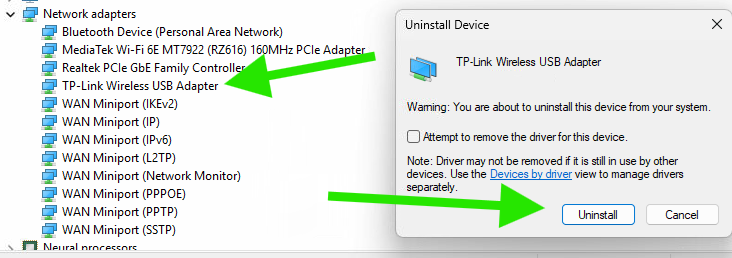
-
Right click on Network adapters and select “Scan for hardware changes”
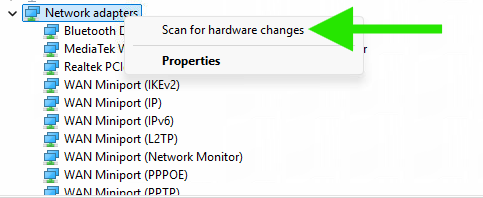
- Confirm on the Wi-Fi settings that Wi-Fi 2* is not connected to any network
Can this happen again?
Yes, this issue can happen again if the TP-Link is wrongly used to connect to other networks; to avoid this from happening it is important that whenever connecting to any network, the “Wi-Fi 2” device is not used (see the following example Wi-Fi 2 vs Wi-Fi).
The below image shows an example of how the connection should NOT look, as it means the selected one is the TP-Link

The below image now shows how the customer should connect his/her computer to any network through the laptop integrated adapter.

Important consideration:
TP-Link might not always be named as “Wi-Fi 2”, the number will change if the customer has previously used other TP-Links/network adapters, however, for most of the Straumann laptops it will be “Wi-Fi 2”.